
Smart landscape lighting control for Miami seasonal homes
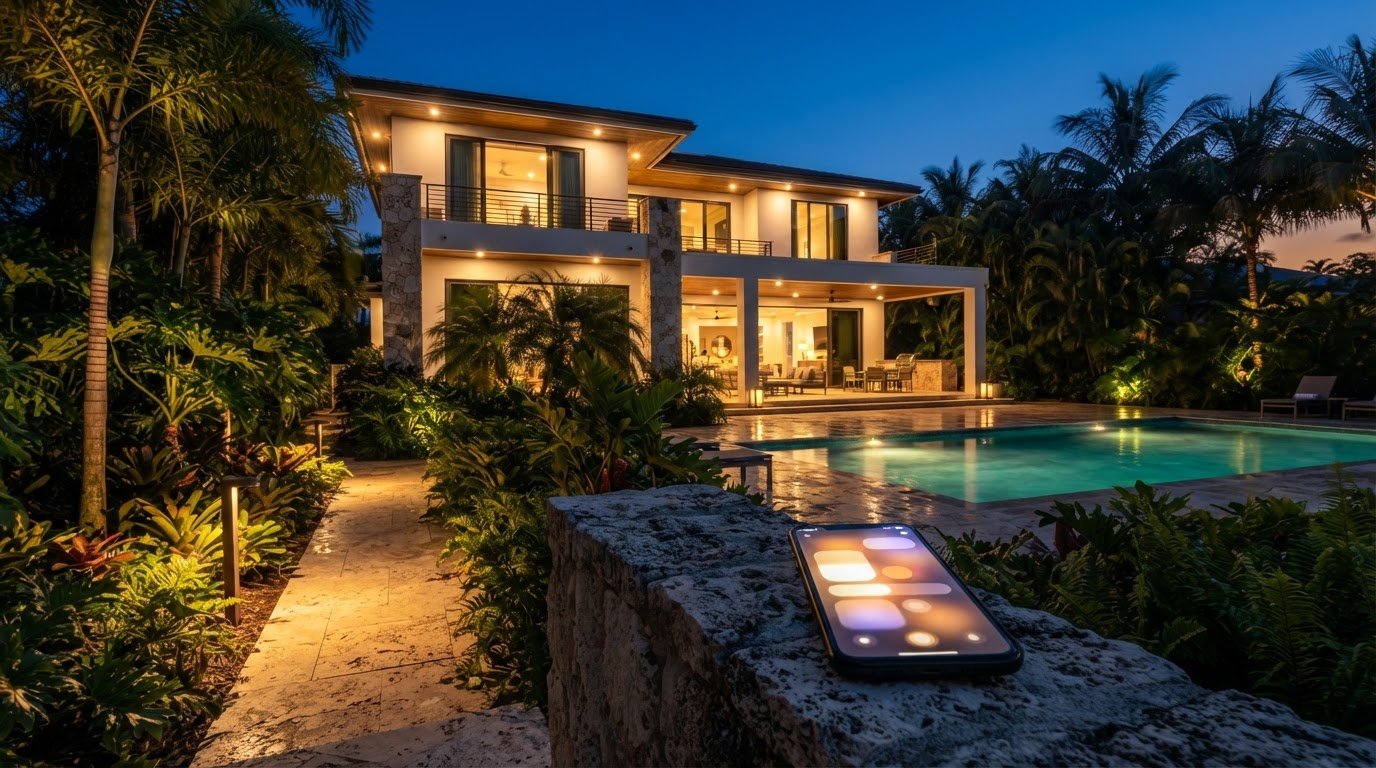
For a seasonal Miami home, smart landscape lighting control can schedule garden, pathway, and pool lighting without daily manual switching. A phone or tablet can connect to a lighting controller, and schedules can follow local sunset times as daylight changes through the year. Remote access and occupancy-responsive controls can also help adapt lighting to changing plans and routines.
A welcoming, well-lit property matters even when you’re away, but lights shouldn’t run on an inconvenient schedule. App access gives you control, while automation can handle regular changes in daylight and how you use the property.
This article explains how app controls work, how to arrange seasonal and sunset schedules, and what to consider for outdoor fixtures around a Miami landscape and pool. It also covers how occupancy-responsive lighting can balance atmosphere with everyday use.
Key Takeaways
- Use app controls to adjust landscape and pool lighting remotely, and organize fixtures into zones for easier management.
- Set schedules to follow local sunset times, then refine them for the routines of a seasonal home.
- Combine sunset schedules with occupancy-responsive control to make lighting fit changing evening use.
- Choose outdoor fixtures and connections suited to Miami’s humidity, UV exposure, and coastal conditions.
- Check controller compatibility with your preferred voice-assistant platform before planning how you’ll manage the system.
What Is App-Controlled Landscape Lighting, Really?
App-controlled landscape lighting lets you adjust outdoor fixtures from a phone or tablet. With smart landscape lighting control in Miami, garden, pathway, and pool lights can be grouped into separate zones.
A lighting system typically combines LED fixtures, a controller, and an app. The controller receives commands and applies them to selected lights, so you can change a garden scene without affecting the pool deck. Before construction limits access to wiring, plan fixture locations, control zones, and any color effects you want.
Miami-Dade permit requirements depend on the project scope and jurisdiction. App control alone doesn’t determine whether a permit applies. Electrical changes are an important factor in deciding which local rules govern the work.
Electricity costs depend on fixture wattage, operating hours, the number of lights, and the utility rate. Dimming lights or switching off unused zones reduces consumption by changing how long fixtures run and at what brightness.
Ketra is one example associated with tunable-white and full-color LED lighting. Tunable white changes the appearance of white light, while full-color lighting can shift among colors. In a Florida home, consider where each effect suits the scene: warm white along a walkway, cooler white near an architectural detail, or a restrained color accent beside landscaping. Available adjustments depend on the fixtures and controls.
Lighting Zones and Controls
Zones let you control groups of lights independently, such as a front entry, garden, and pool deck. For each zone, decide whether you need brightness adjustment, color selection, or both. A dimmed path can stay distinct from a brighter entrance, and a garden’s color setting can change without affecting nearby white lighting. Give each zone a clear name in the app so seasonal residents can find the right control quickly.
Smart Controller Compatibility
Compatibility with Alexa, Google Home, or Apple HomeKit depends on the controller and its supported connections. A phone app does not automatically mean voice-assistant support. Identify the control features you want, then match them to the controller’s stated ecosystem and the lighting system’s requirements. This matters when adding fixtures to existing controls or choosing one interface for outdoor zones.
Daylight adjustment and seasonal residence scheduling
For homeowners considering smart landscape lighting control in Miami, schedules can align outdoor illumination with changing daylight and occupancy. Location-based controls can adjust lighting times automatically around local sunrise and sunset.
Calendar-Based Lighting Schedules
A calendar schedule can organize scenes around planned occupancy and recurring routines. For example, set entry and walkway zones to illuminate at sunset during your usual stay, then use a different schedule when the home is unoccupied. Review the days and start times for each scene so garden accents don’t stay on longer than intended.
Some app-controlled systems can adjust schedules to local sunrise and sunset based on the home’s location. This keeps the trigger aligned with daylight as seasons change, rather than relying on one fixed clock time. Set the correct location in the app, then choose whether each zone turns on at sunset, switches off at sunrise, or runs for a shorter period.
Separate schedules make a system more useful. A pool-deck scene might run through evening use, while pathway lighting switches off earlier. A garden scene can follow a sunset trigger for a set period. With smart landscape lighting control in Miami, give each area a distinct purpose instead of applying one schedule to every fixture.
Remote Control and Scheduling
Remote access lets you adjust a scene from your phone when travel plans change. If a seasonal resident arrives earlier than expected, they can activate entry and pathway zones before reaching the property. If plans shift, they can change the schedule without resetting each fixture individually.
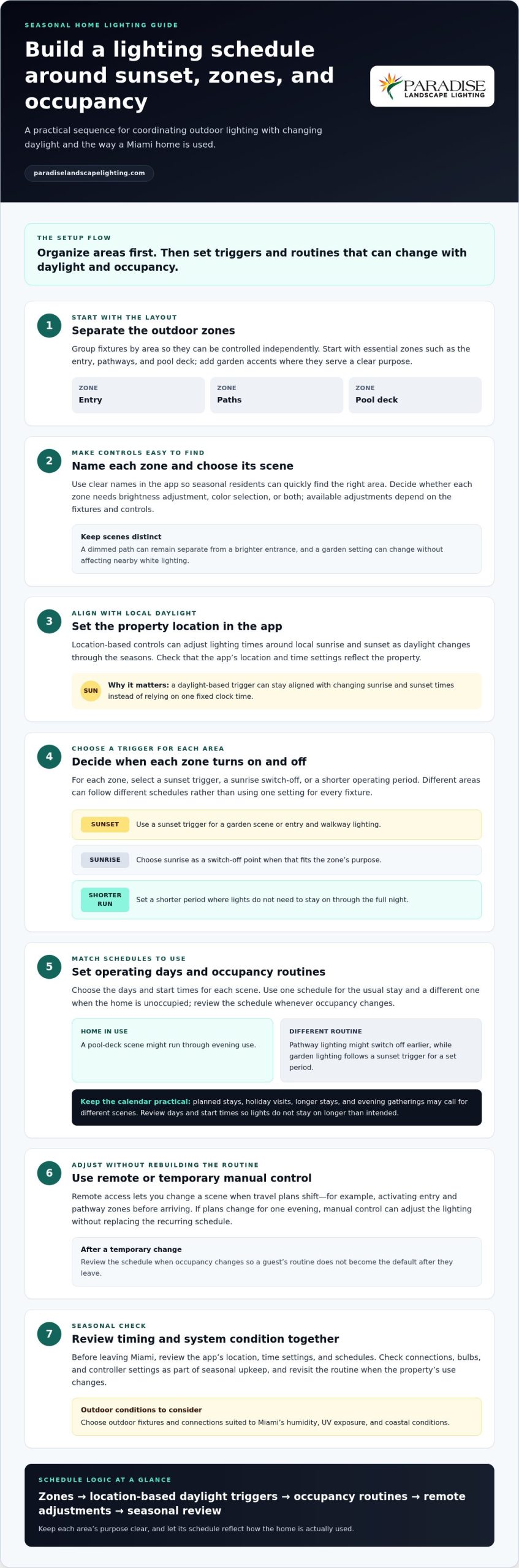
Set up a routine in clear steps: name the zones, choose a scene, set its operating days, and select a sunset or sunrise trigger. Review the schedule whenever occupancy changes. This helps prevent a guest’s temporary routine from becoming the default after they leave.
Calendar controls work best when they reflect actual use, not just dates. A holiday visit, longer stay, or evening gathering may call for a different scene. Create a separate schedule for those occasions, then return to the regular routine afterward. If the system offers manual control, use it to adjust lighting for one evening without replacing the recurring schedule.
Keep the setup practical. Start with essential zones, such as the entry, paths, and pool deck, then add garden accents where they serve a clear purpose. Review the schedule from the app before leaving Miami, and make sure its location and time settings reflect the property. For a tailored layout, plan outdoor lighting around your property.
Include controller settings in each seasonal review. Landscape lighting can be controlled remotely or automated in response to sunset, occupancy, or seasonal events. Revisit the schedule when the property’s use changes, and use remote access for temporary adjustments without changing the regular routine.
Seasonal checks of connections, bulbs, and controller settings can help keep outdoor lighting working in Florida’s climate. Review these alongside the schedules so timing and occupancy settings remain coordinated with the system’s condition.
Sunset- and occupancy-responsive automation
Automation links a lighting event to a trigger, such as sunset, occupancy, or a seasonal routine. In South Florida, a custom setup can combine triggers while giving each outdoor zone a clear purpose.
Sunrise and Sunset Automation
Location-based controls can adjust schedules to local sunrise and sunset, following daylight rather than one fixed clock time. Set a sunset scene for entry and pathway lights, then choose a separate sunrise action, such as switching those zones off. Check the property location in the platform and confirm each scene’s trigger before relying on it while away.
Sunset automation suits predictable evening needs, such as illuminating a walkway as daylight fades. Occupancy adds another response: a sensor can activate selected lights when a space is in use. The U.S. Department of Energy explains that LED sources can integrate with sensors and control systems to save energy through occupancy sensing and local light-level control. Choose zones and light levels to suit the activity.
Zones, Scenes, and Automations
A zone is a group of fixtures, while a scene stores their selected settings. An automation connects that scene to a trigger. For example, a sunset trigger could activate a welcoming entry scene, while occupancy sensing controls a separate path zone. Name zones by location, then make each trigger and response easy to understand in the app.
Keep triggers distinct. If sunset and occupancy both control the same fixtures, decide how those instructions should interact. For example, sunset can illuminate the entrance while occupancy sensing adjusts a nearby path. Local light-level controls let you tailor illumination to how an area is used instead of leaving every zone at the same setting.
Remote access adds flexibility for seasonal homes. Wherever you can access the platform, you can change a scene when arrival plans shift or temporarily override an automation. Treat a manual change as a one-time adjustment, then restore the regular routine so it resumes after that evening.
Plan a routine for app and system updates, too. Check the app’s update settings and the controller’s instructions before a planned stay. After an update, test the sunset trigger, occupancy response, and each scene in the app. This confirms that the custom sequence still suits the property’s use instead of assuming every setting was preserved.
For a clear setup, write down each trigger, the zones it affects, and the intended response. A simple entry scene at sunset and a separate occupancy response for a path are easier to manage than overlapping commands. Review the sequence when seasonal routines change.
Outdoor and pool lighting
Outdoor lighting has two roles around a Miami home: shaping the evening atmosphere and making key routes easier to see. Start with the garden, entrance, pathways, and pool deck, then decide which areas need separate controls. A switch or app scene can light the route to the pool without turning on every garden accent. Separating zones makes the system easier to use and gives each area a clear purpose.
Along pathways, stairs, and entrances, well-placed lights can improve visibility and help reduce accident risks. Aim fixtures at walking surfaces and transitions rather than into someone’s eyes. A softly lit walkway can guide guests from the driveway to the entrance, while a brighter setting highlights a step. These functional layers can also enhance the property’s appearance after dark.
Give pool-deck lighting its own zone. You might set a welcoming scene for the deck while keeping nearby garden lighting subdued. Direct light toward the deck and surrounding features, and consider how reflections look from inside the house. Separate controls make it easier to adjust the pool area without changing the rest of the outdoor lighting.
Miami’s coastal conditions matter when selecting fixtures. Salt air can corrode outdoor lighting connectors over time, while humidity can affect inadequately sealed housings. Choose fixtures rated for humidity and UV exposure, and consider the connector and housing as well as the visible design. A discreet fixture can preserve a garden’s daytime appearance while withstanding outdoor exposure.
Light placement matters as much as fixture choice. Moonlighting uses fixtures high in trees to cast a soft, natural-looking wash across a garden. Dark sky-friendly fixtures are designed to limit light spillage and help combat light pollution. Use a focused beam for a sculpture or tree canopy, and avoid directing light toward neighboring properties or the night sky.
LEDs paired with advanced controls can support lower energy use. The U.S. Department of Energy says advanced controls with efficient LED lighting can provide an additional 20 to 40 percent in energy savings over LED lighting alone. Occupancy sensing and local light-level control can help tailor illumination to use. A sensor near a path, for instance, can respond when someone enters that area.
In 2025, outdoor lighting trends included color-changing effects, discreet daytime fixtures, pathway intelligence, and lifestyle automation. Treat these as design options, not a reason to add complexity everywhere. Choose a restrained color accent for a garden feature, then use clear white light for a route. The practical takeaway: plan pool, path, and garden zones separately, then select weather-suited fixtures and controls for each purpose.
What smart lighting controllers work with landscape lights, Alexa, Google Home, or Apple HomeKit?
Choose a controller explicitly compatible with both the landscape lighting system and your preferred smart-home platform. Alexa, Google Home, and Apple HomeKit are separate ecosystems, so support for one doesn’t establish support for the others. Match the controller’s stated compatibility to the voice assistant or app you plan to use.
Start with the lighting system. Residential app-controlled landscape systems commonly use low-voltage wiring, with a controller communicating with a phone or tablet over Wi-Fi or Bluetooth. The controller bridges the lighting circuits and app commands. Check that the supported system can control the fixture groups you want, including dimming or color functions where needed.
Next, confirm platform support. A controller may have its own app without integrating with Alexa, Google Home, or Apple HomeKit. If voice control matters, look for explicit compatibility with the exact platform and controller. Don’t rely on general terms such as “smart” or “app-controlled,” which don’t specify voice-assistant integration.
Think through a typical command before choosing. For example, decide whether “turn on the pool deck” should affect only that zone or activate a wider outdoor scene. Check that the controller can make your intended zones and scenes available to the platform. If you prefer app control, confirm that its settings meet your needs without requiring a separate assistant.
A practical selection process keeps the decision clear:
- Identify the system: note whether the existing landscape lights use a controller and how it communicates.
- Name the platform: choose Alexa, Google Home, Apple HomeKit, or app-only control.
- Match features: verify support for the required zones, dimming, and color adjustments.
- Test the intended scene: confirm a command changes the correct outdoor area.
Voice control can simplify a task, such as switching on an entry scene before guests arrive. A button or app may work better for other routines, especially when you want precise control over individual zones. Choose an interface based on how you use the garden, walkway, and pool deck, rather than adding features that won’t improve everyday operation.
For an integrated layout, plan the fixture zones and control approach together. That helps align the landscape design with the controller’s capabilities before installation. Plan your landscape lighting design around the scenes and controls you want.
Focus on the functions you expect to use, and choose a controller that provides them without adding controls you don’t need. Start with your actual routines: decide which areas should respond together, which should stay separate, and whether you want to make changes by app, button, or voice. Smart outdoor lighting systems in Miami can be controlled by button or voice command. Whichever method you prefer, verify that the selected controller supports the lighting system and the functions each zone requires. If several interfaces are available, choose the one that will be easiest to use for everyday adjustments. A clear plan keeps the controller, lighting layout, and preferred controls aligned.
Paradise Landscape Lighting: Landscape Lighting Design
Paradise Landscape Lighting can turn your goals into a coordinated outdoor design, with controls planned around how you use the property. Its team brings together lighting design and engineering to plan residential outdoor spaces with visual composition and technical requirements in mind.
Consider professional design when coordinating app-controlled zones across a garden, architectural feature, and pool deck, or planning lighting for a seasonal home. Paradise Landscape Lighting’s Landscape Lighting Design and LED Lighting Installation can create a cohesive system, while Sculpture and Artwork Lighting or Pool Deck Lighting can address focal points and gathering areas.
Share which areas you want illuminated, how you use them, and how you’d like to manage the scenes. Contact Paradise Landscape Lighting to discuss your outdoor lighting project.
Shape a Lighting Plan Around Your Next Stay
A seasonal home benefits from a lighting plan shaped around how you want to arrive, gather, and move through the property. Before your next stay, consider which outdoor spaces should feel welcoming first and which details deserve a quieter accent. That vision gives smart landscape lighting control in Miami a purpose beyond convenient switching.
Paradise Landscape Lighting can translate those priorities into a considered outdoor plan. Its Landscape Lighting Design and LED Lighting Installation support a coordinated approach, while Sculpture and Artwork Lighting can draw attention to a favorite piece. The result is an intentional setting that’s straightforward to manage between visits.
Share the outdoor areas you want to shape and the atmosphere you hope to create. Contact Paradise Landscape Lighting to discuss a design for your home. A thoughtful first step can make your next evening outdoors feel more distinctly your own.
Frequently Asked Questions
What smart landscape lighting systems and features are available in Miami?
Smart landscape lighting control in Miami can combine app-managed scenes with low-voltage outdoor LED lighting, dimming, and color options. Available features depend on the controller and fixtures selected. Consider how you want to light a specific setting, such as a fountain, artwork, or pool deck. Paradise Landscape Lighting designs and installs custom residential outdoor lighting systems across South Florida.
How do smart landscape lighting systems compare: Wi-Fi, Bluetooth, Zigbee, and wired controls?
Residential systems commonly use low-voltage wiring, with a controller communicating with a phone or tablet over Wi-Fi or Bluetooth. The article does not compare these options with Zigbee or other wired control methods.
What are common security, electrical, and weather-related risks with outdoor smart lighting?
In coastal South Florida, salt air can corrode outdoor lighting connectors, and humidity can affect inadequately sealed housings. Choose fixtures rated for humidity and UV exposure. Electrical changes can affect which local rules apply, and lighting along pathways, stairs, and entrances can improve visibility and help reduce accident risks.
Return to News