
How to Choose and Program an Automatic Landscape Lighting Timer
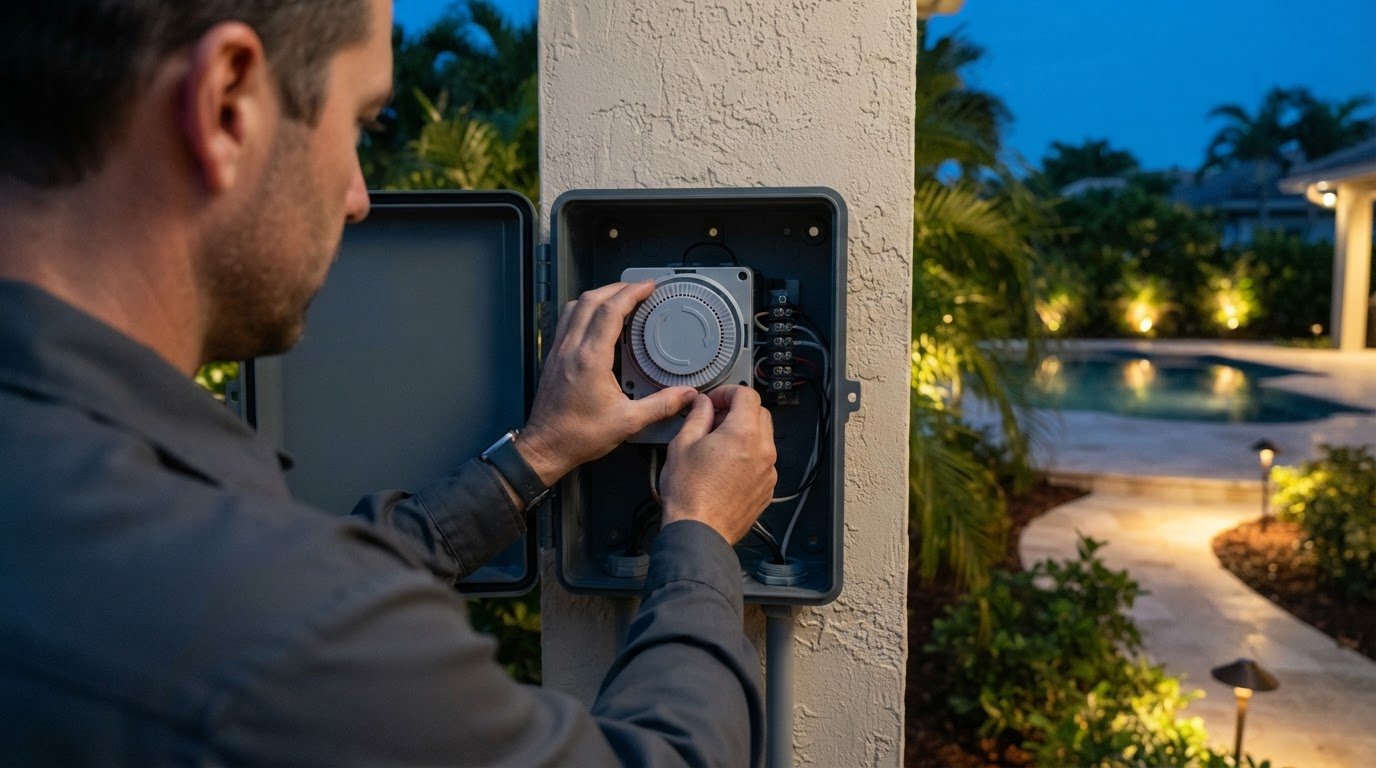
The most advanced timer isn’t automatically the best choice for your landscape. A well-planned automatic landscape lighting timer setup matches the control to how each area should look and function: a fixed schedule suits consistent hours, while an astronomical timer adjusts its sunset and sunrise times throughout the year.
It makes sense to want lights to come on at dusk without running longer than needed. The right setup depends on whether a photocell should respond to ambient light, a timer should set a firm shutoff time, or both controls are needed. This guide explains how to weigh mechanical, digital, astronomical, and smart timer options, program a schedule, and account for seasonal changes. You’ll also learn when a photocell alone may work and when pairing it with a timer gives you more control over how long landscape lighting stays on.
Key Takeaways
- Choose a timer schedule around how each outdoor area is used, rather than running every light for the same hours.
- Consider an astronomical timer if you want sunset and sunrise schedules to adjust automatically through the seasons.
- Use a photocell for light-responsive switching, and consider adding a timer when you also want a set shutoff time.
- Compare mechanical, digital, astronomical, and smart controls by the level of programming and upkeep your lighting plan calls for.
Which Landscape Light Timer Is Best for Your Project?
A professional matches timer control to each area’s purpose and preferred hours. An automatic landscape lighting timer setup should provide useful light without keeping every fixture on longer than necessary.
-
Compare Available Timer Types
Choose control based on how the lights should function. A photocell responds to ambient light; a mechanical timer uses tabs or pins on a rotating 24-hour dial. Digital controls support multiple daily or weekly schedules, while smart timers add app-based programming. Before selecting one, the professional checks switching capacity and compatibility with the lighting system.
-
Plan Schedules for Different Outdoor Areas
Set hours according to each area’s use. Garden accents and trees can run from sunset until 9:30 or 10:00 PM; walkways and driveways may stay lit until 10:30 or 11:00 PM. General accent lighting often shuts off between 11 p.m. and midnight, while entries, garages, and dark walkways may need light all night for safety or security.
A professional sets separate schedules for areas with different purposes, rather than applying one routine to every fixture.
-
Set Digital and Astronomic Schedules
Program digital controls with the intended days and on-off events. For example, lights can turn on at sunset and off at 11:00 PM. An astronomic timer uses location and date to calculate sunrise and sunset, then adjusts through the year. The professional enters those details at installation and confirms operation after dark.
To complete an automatic landscape lighting timer setup, a professional follows applicable local electrical-code requirements and product instructions, protects connections from moisture, and isolates power before servicing. They compare the timer’s rated load with the transformer’s wattage and amperage. If lights fail to switch, they check the manual override, clock and AM/PM settings, programmed events, and mechanical tabs. After a power outage, they also check the clock and backup power.
Astronomical timers and automatic seasonal adjustment
Choose an astronomical timer when outdoor lighting should follow changing dusk and dawn rather than fixed clock times. A professional sets its location and date, then checks the schedule after dark.
-
How Professionals Set Up Digital and Astronomical Timers
Program a digital timer with the intended days and operating events, then confirm its clock and AM/PM settings. Digital controls can support multiple daily or weekly schedules, making them useful when lighting needs vary by day.
At installation, enter the correct location and date for an astronomical timer. It calculates sunrise and sunset for that place and date, adjusting outdoor lighting as dusk shifts through the seasons without a physical light sensor.
-
How Professionals Configure Automatic Seasonal Adjustment
Use the astronomical function to track seasonal changes rather than relying on one fixed start time. Actual dusk shifts by more than an hour across the year, so a schedule fixed at 7 p.m. may start after dark in summer but while it’s still light in winter.
Set any available sunset offset to suit the outdoor space. Some timers allow a 15-minute adjustment earlier or later; some also offer a sunrise setting 30 minutes early. The professional weighs those options against the desired appearance and how long the lights should remain on.
- Test the installed schedule after dark and adjust it to achieve the intended effect. If the timer loses power, check its clock and backup-power status; a mechanical timer may need to be reset manually after an outage. A digital timer with battery backup can help preserve its settings, but check the display and programmed events as well.
For a coordinated plan, landscape lighting design can bring fixture placement and operating schedules together across an outdoor space.
Is a Photocell Alone Enough, or Do You Need a Timer Too?
Choose a control based on whether fixtures should respond only to daylight or also follow a defined shutoff schedule. A photocell-and-timer combination can provide both.
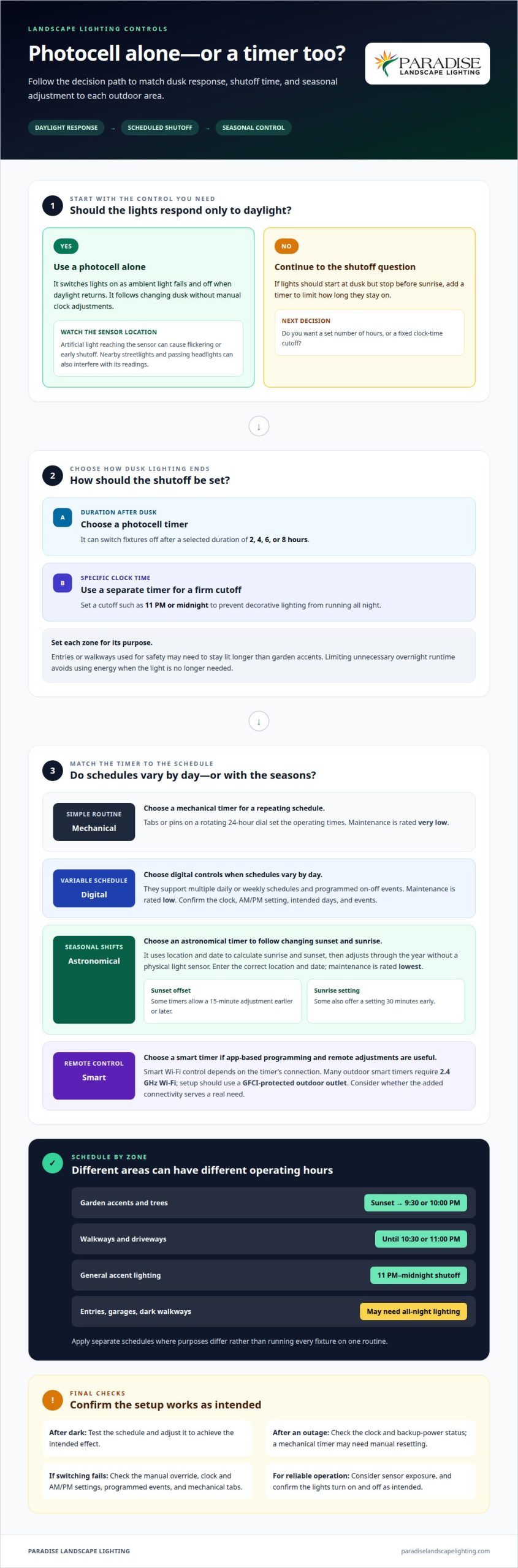
- Use a photocell alone when you want dusk-to-dawn operation. It switches lights on as ambient light falls and off when daylight returns, following changing dusk without manual clock adjustments. Consider the sensor’s location: artificial light reaching it can make fixtures flicker or shut off early. Nearby streetlights and passing headlights can also interfere with its readings.
If a photocell can’t reliably sense darkness, its location and exposure may compromise the control. A professional accounts for these conditions when selecting a setup for the outdoor space.
- Add a timer when the lights should come on at dusk but stop before sunrise. A photocell timer can switch fixtures off after a selected duration of 2, 4, 6, or 8 hours. A separate timer can instead set a fixed cutoff, such as 11 PM or midnight, preventing decorative lighting from running all night.
Set the cutoff according to each zone’s purpose. Entries or walkways used for safety may need to stay lit longer than garden accents. Limiting unnecessary overnight runtime also avoids using energy when the light is no longer needed.
- Match digital or smart control to the desired programming and upkeep. Mechanical timer maintenance is rated very low, digital maintenance low, and astronomical timer maintenance lowest. A digital timer suits programmed schedules; a smart Wi-Fi timer adds connected control. Many outdoor smart timers require 2.4 GHz Wi-Fi, and setup should use a GFCI-protected outdoor outlet.
For homeowners who want remote adjustments, app-based control can be useful, but it depends on the smart timer’s connection. Confirm that lights turn on and off as intended, and consider whether the added connectivity serves a real need. Running low-voltage lights 24 hours a day wastes energy when illumination isn’t needed.
What types of landscape lighting timers are available: photocell, mechanical, digital, and smart?
Compare how each control responds, how much programming it requires, and which conditions affect its operation. The right choice depends on whether your priority is light-responsive switching, a simple schedule, or more flexible control.
- Choose a photocell when fixtures should respond to ambient light. It switches landscape lights on as daylight fades and off when the area brightens. A professional considers the sensor’s direction and position, since light from nearby fixtures, streetlights, or passing headlights can interfere with its readings. A photocell suits automatic dusk-to-dawn operation, but doesn’t set a separate clock-based cutoff by itself.
- Select a mechanical timer for straightforward daily scheduling. Most use a rotating 24-hour dial with tabs, pins, or trippers that mark on and off times. Push-style models use tabs moved in or out to define operating periods. Mechanical controls generally provide 1-2 daily cycles, making them practical when a consistent schedule suits the outdoor lighting plan.
- Use a digital timer when the schedule needs more detail. Digital controls support multiple daily or weekly programming options, and a seven-day timer can vary operation across the week. A professional enters the intended events and confirms the clock, selected days, and AM/PM settings. Some digital timers have battery backup to help preserve timekeeping during a power interruption.
- Consider a smart timer when connected control is useful. Many outdoor smart timers require a 2.4 GHz Wi-Fi connection, and setup should use a GFCI-protected outdoor outlet. App-based controls can support remote schedule adjustments. Before choosing one, weigh the benefit of connected control against the need for a reliable network connection.
- For a coordinated choice, plan your landscape lighting around each area’s purpose, sensor conditions, and preferred schedule.
Paradise Landscape Lighting
Paradise Landscape Lighting helps homeowners bring outdoor illumination into a considered plan, from fixture placement to how each area serves the property. If you’re choosing between photocell, digital, or astronomical control, the timer should support the lighting’s purpose and the schedule you want, rather than dictate the design.
With Landscape Lighting Design and LED Lighting Installation, Paradise Landscape Lighting can create a cohesive approach for gardens, pools, architectural features, and other outdoor spaces. This is a natural next step when timer decisions are part of a broader lighting project or you’re planning new fixtures alongside existing landscape features.
For a thoughtful plan tailored to your outdoor space, contact Paradise Landscape Lighting.
Shape a Lighting Plan That Can Grow With Your Landscape
A well-planned automatic landscape lighting timer setup should suit how you use your outdoor space now and allow for changing priorities. A renovated path, newly planted garden, or sculpture added as a focal point can change which areas deserve emphasis and when they should be illuminated.
Paradise Landscape Lighting can align timer choices with the broader design through Landscape Lighting Design and LED Lighting Installation. Sculpture and Artwork Lighting can also bring a distinctive focal feature into the overall composition. Consider how your outdoor areas function, what you want to highlight, and how lighting should support those spaces after dark, then contact Paradise Landscape Lighting to plan your project.
Contact Paradise Landscape Lighting for timer help and discuss a lighting plan that feels considered, cohesive, and suited to your landscape.
Frequently Asked Questions
Feature Comparison: Which Timer Is Right for Your Project?
Choose a control that fits the schedule’s complexity and the conditions around each fixture. A mechanical timer suits a consistent routine, while digital programming helps when weekdays and weekends differ. Astronomical control is useful when you want timing to follow local dusk and dawn. For example, a homeowner with one simple accent-lighting schedule may not need app-based control.
How does a professional set up an automatic timer for landscape lighting?
A professional matches the timer to the lighting system and desired operation, then programs and tests the schedule. If a property has separate lighting zones, for example, they consider whether each zone should follow the same timing or needs distinct control. The final check confirms that the intended fixtures respond to programmed events and that the schedule suits the outdoor space.
How does a professional set on and off times on common outdoor lighting timers?
The method depends on the timer design. On a clip-style model, the green clip marks the on time and the red clip marks the off time; push-style models use tabs moved to set events. A professional checks AM or PM, sets the timer to the current time, and confirms the schedule before restoring power and closing the transformer.
Should landscape lights use a photocell, astronomical timer, or sunset-based schedule?
Use a photocell when control should respond to actual ambient light, and astronomical scheduling when timing should follow calculated sunset and sunrise for a location. A sunset-based clock schedule suits a chosen fixed routine. If a nearby streetlight or headlight reaches a photocell, its readings may be disrupted, so sensor placement matters.
How does a professional adjust a landscape lighting schedule for daylight saving time and seasonal sunset changes?
An astronomical timer uses its location and date to adjust automatically for seasonal sunset changes. A fixed-time schedule needs manual adjustment as dusk shifts, while some digital timers include a daylight-saving adjustment feature. For homes in Fort Lauderdale, Weston, Southwest Ranches, Wilton Manors, Palm Beach, Miami, Miami Beach, Coral Gables, Plantation, West Palm Beach, and Coconut Grove, a professional can confirm the programmed result after dark.
How do you wire a timer to low-voltage landscape lighting safely?
Isolate power before servicing, and have a professional check the timer’s rated load against the transformer’s wattage and amperage. The article does not provide wiring steps.
Return to News